
Getting Paid
Passenger Budgets
Every passenger group in the demand pool has a budget: the maximum amount they are willing to spend to reach their final destination. This budget is set when the demand is generated and reflects the distance, class, and desirability of their journey.
When you accept a job and board passengers, each group's budget is split proportionally across every leg of their journey — from their origin to their final destination. The portion allocated to your leg is determined by how much of their total journey (by distance) your flight covers.
For example, if a group has a £1,000 budget and your leg covers 60% of their total journey distance, your leg will be worth up to £600 of that budget.
The budget is never modified directly. It is used purely to calculate how much each leg is worth. What you actually receive is the payment amount, which may differ due to augmentation (see below).
Base Pay
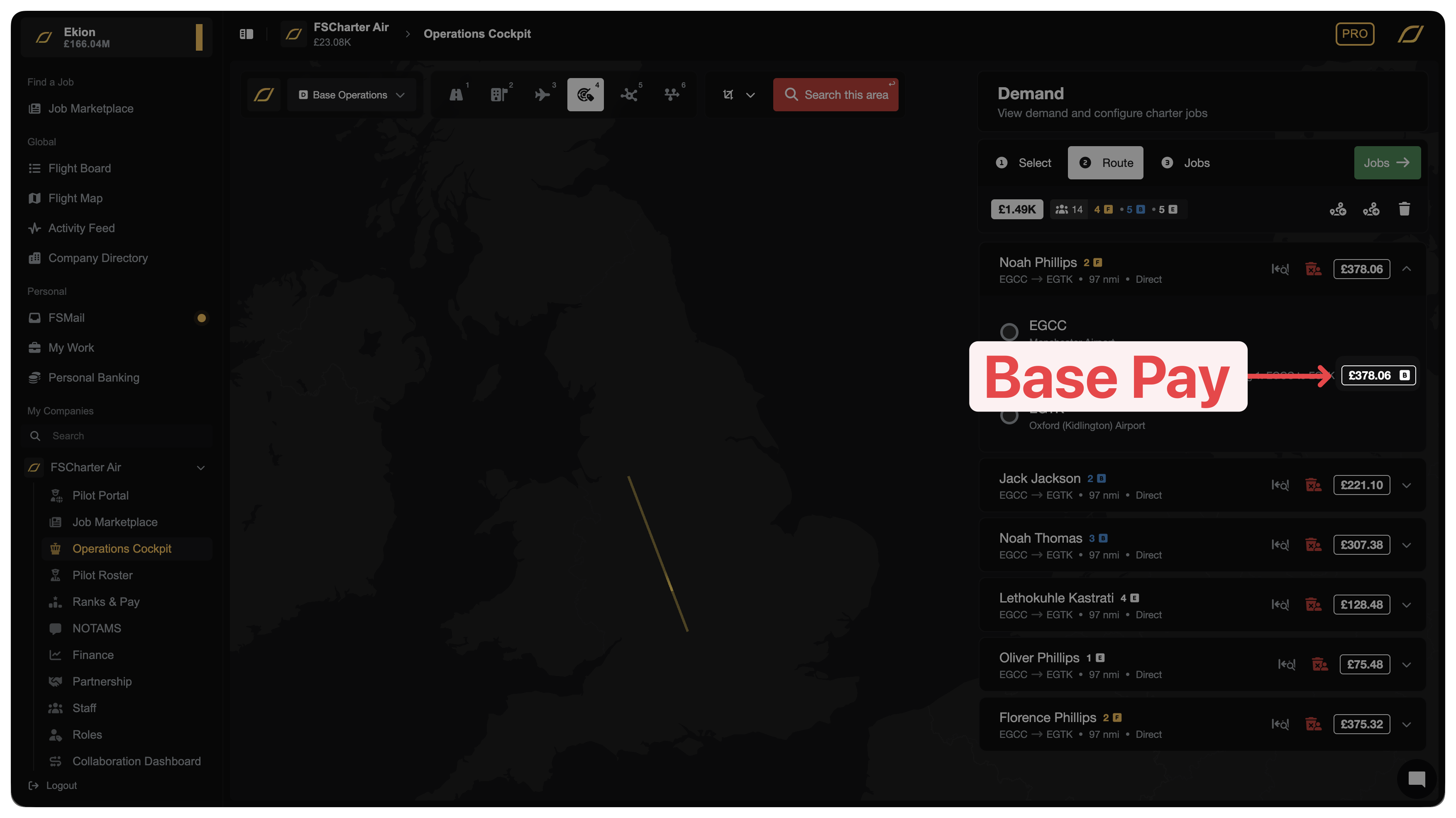
Your base pay for a passenger group is the portion of their budget allocated to your specific leg. It is calculated proportionally:
Base pay = Remaining budget × (This leg's contribution ÷ Sum of all remaining contributions)
The "contribution" of each leg is based on how much of the passenger's full journey (by great-circle distance) that leg covers. Legs that cover more ground receive a larger share of the budget.
The final leg of a passenger's journey always receives all remaining budget, ensuring no money is left unallocated.
Augmented Pay
On top of base pay, FSCharter adds a bonus payment — called augmentation — to reward you for flying passengers:
Route jobs: A flat £50 per passenger bonus is added to every leg.
Charter jobs: A scaling bonus is applied to the first leg of each passenger group in the job. The bonus starts at up to £1,000 per group for small groups and decreases as the number of passengers on the aircraft size grows, rewarding smaller charters.
Augmentation is calculated automatically when passengers are assigned to your job and is included in your final payout. You don't need to do anything extra to receive it.
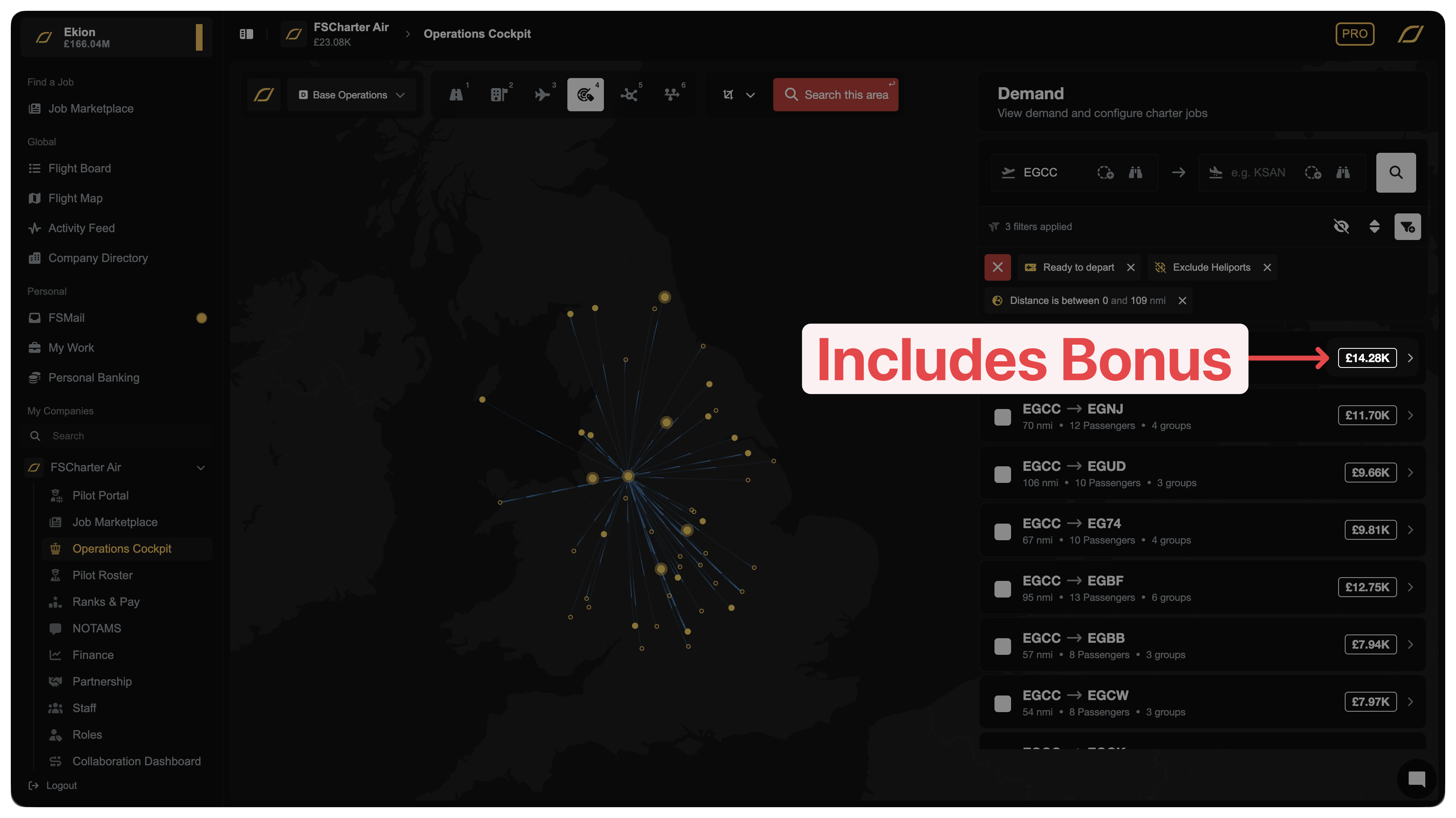
The price you see when selecting demand includes the bonus. You can see the true base price on the Route and Jobs tab of the Dispatch Plan creator.
You Don't Get Paid Until Passengers Reach Their Final Destination
This is an important distinction: you are only paid when passengers reach their final destination.
If a passenger group is using your flight as a connecting leg (e.g. they board at A, fly to B with you, but their final destination is C) you will not receive payment when you land at B. Payment is held until another airline (or you, on a subsequent leg) flies them to C.
This means:
If you fly a connecting passenger and they never complete their journey (e.g. no onward route exists or is taken), payment may be delayed indefinitely.
Passengers whose final destination is your arrival airport will pay out immediately on landing.
Proportional Pay Across Companies
When multiple companies fly different legs of the same passenger group's journey, each company is paid for their own leg independently when the journey completes.
Payment is split based on each leg's proportional contribution to the total journey distance. For example:
Company A flies EGCC → KLAX (60% of journey distance) → receives 60% of the budget + augmentation for their leg
Company B flies KLAX → KJFK (40% of journey distance) → receives 40% of the budget + augmentation for their leg
Each company's payment is processed separately and goes directly into their own account. There is no shared pool — each leg earns its own independent share (unless you are in a Partnership and have enabled revenue sharing).
Only Flying Passengers Who Pay Straight Away
If you want to maximise immediate income, you need to primarily board last-leg passengers: groups whose final destination is your arrival airport (or within your Passenger Services radius). These passengers pay out in full the moment you land.
Charter
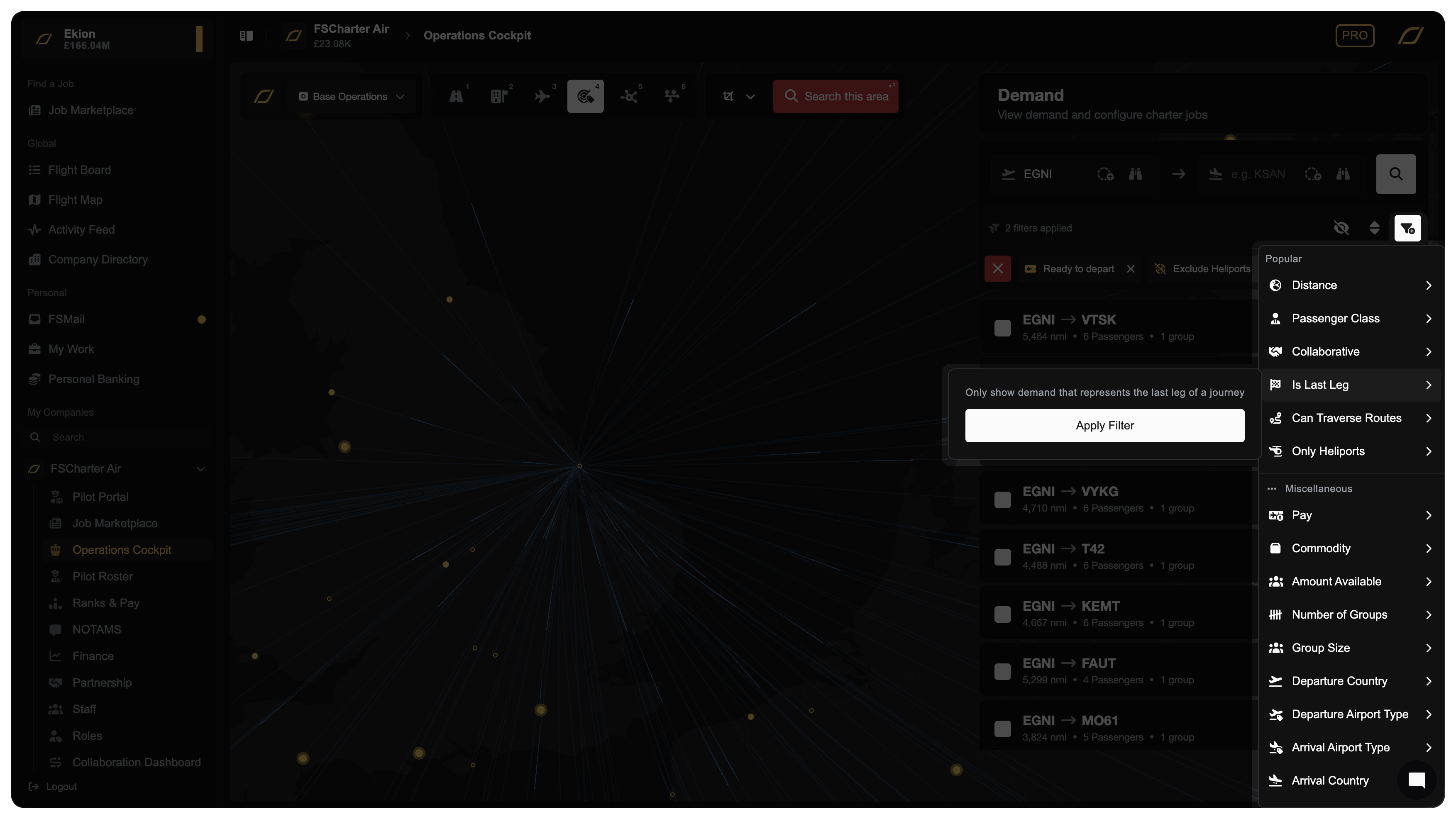
When creating a Charter Job, simply apply the Is Last Leg filter to your demand search and you will only see passengers that will pay immediately.
Routes
You can't manually choose which passenger groups board Routes — just like in the real world, airlines can't control who buys their tickets. But you can control who scores highest for boarding priority using Pricing Strategies, and even completely out-price certain cohorts.
How boarding priority works
When demand exceeds available seats, every passenger group is given a boarding priority score. That score is primarily driven by the bargain factor — how attractive your ticket price is relative to what that passenger can afford — with a small random element to keep things fair. Groups with a higher score board first.
The system doesn't inherently prefer last-leg passengers. It simply boards whoever scores highest. That's why you can end up carrying connecting passengers even when there's plenty of last-leg demand — and why some of them won't pay out until later.
By manipulating the price that connecting passengers see, you can push their score low enough that they consistently lose out on seats to last-leg passengers.
Setting up a Pricing Strategy
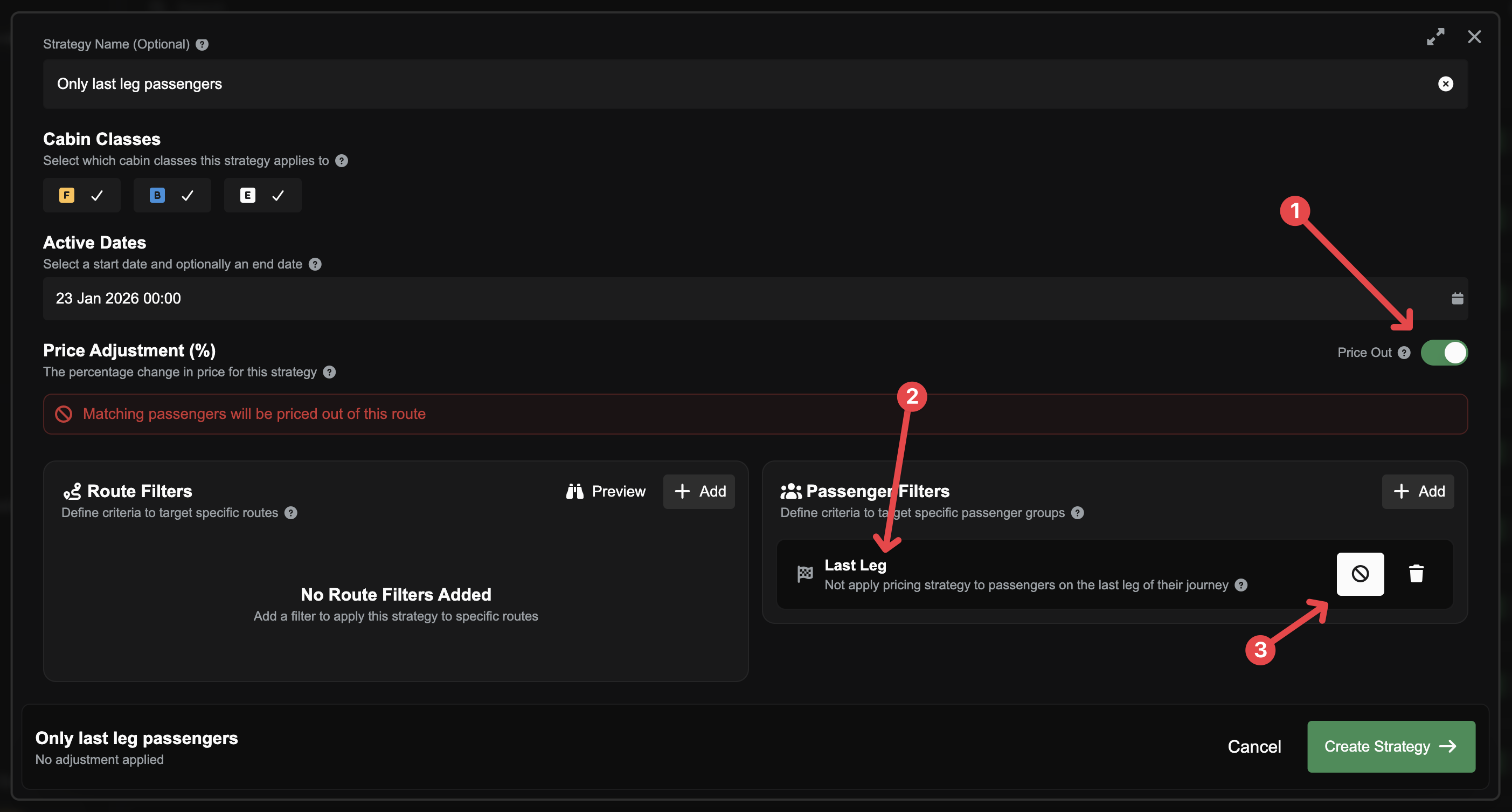
Go to Pricing Strategies and create a new strategy.
Add a Demand Filter → Last Leg.
Toggle Exclude — this makes the strategy apply to passengers who are not last-leg (i.e. connecting passengers).
Either apply a large surcharge (e.g. +200% or more) or click the Price Out button to make those passengers unable to afford the ticket entirely.
Alternatively, you can target last-leg passengers directly (without toggling Exclude) and give them a discount to make their boarding scores even higher.
The end result: connecting passengers score too low to board, last-leg passengers fill your seats, and you receive payment the moment you land.
Premium tip: If you're on a Premium subscription, you can preview boarding priority scores and see the full score calculations by clicking the binoculars (preview) icon on a route.
You can read more in the Pricing Strategies article.
Cabin Upgrades and Revenue
If seat upgrades are enabled on your route and a passenger upgrades to a higher cabin class then they pay the ticket price of the upgraded class, not their original class.