
Pilot Rosters
Pilot Rosters define the working arrangements for company pilots. Rosters are permanent - pilots join your company once and remain on the roster until they choose to leave or are removed.
How Rosters Work
When a pilot joins your roster, they gain ongoing access to fly your company's jobs based on their assigned rank.
Pilots can be eligible for multiple ranks within your company if they meet the requirements. This allows them to switch between ranks freely to access different aircraft types or pay rates, although they may only have one active rank at any time.
Pay
Pilot pay is configured per rank. All pilots at the same rank earn the same hourly rate for their flight time.
To configure pay:
Navigate to Ranks & Pay in the left sidebar
Click on the rank you wish to configure
Set the Hourly Pay amount
Click Save
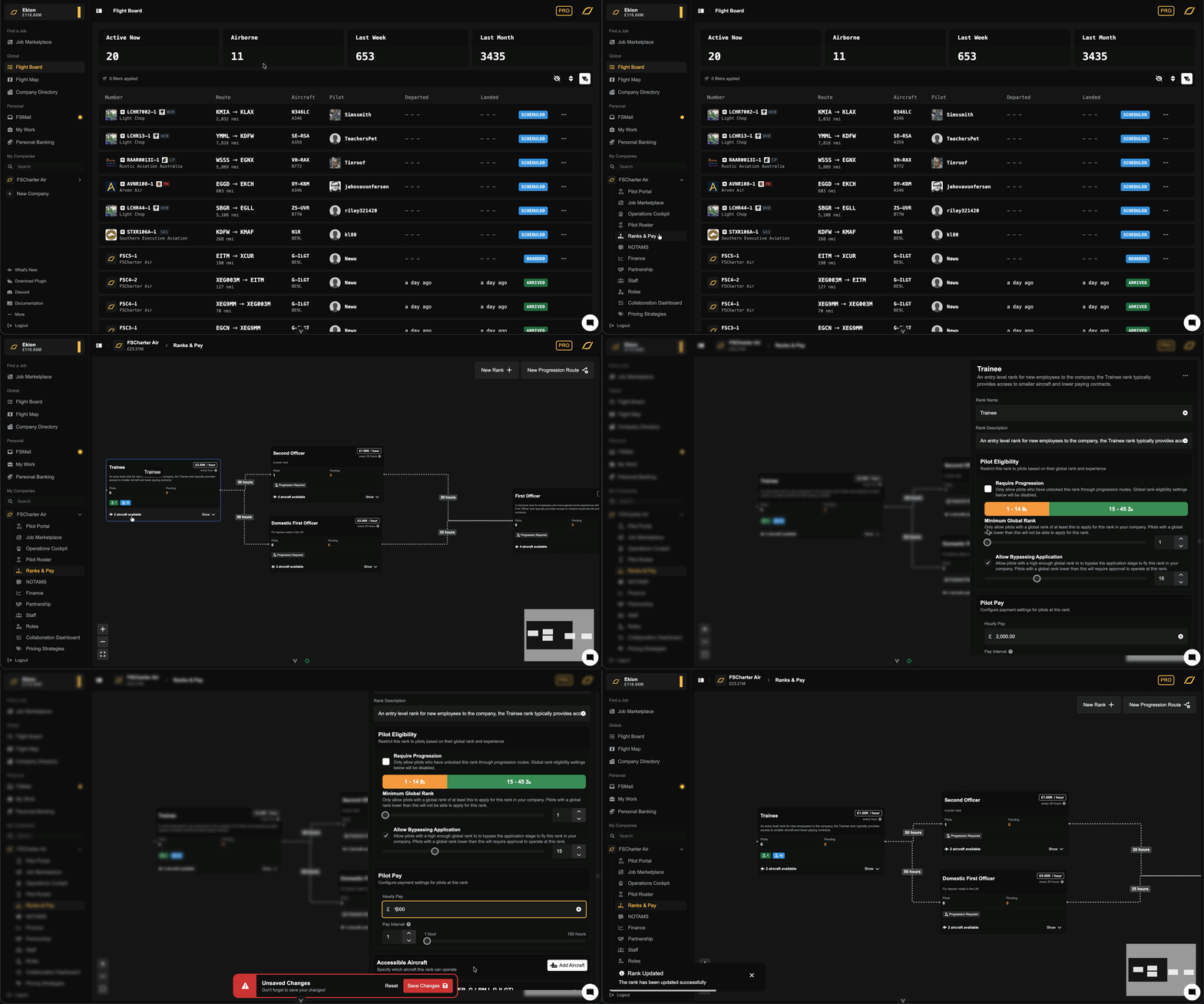
Pilots are paid automatically based on the hours they fly and pay is released based on the interval that you set. If you pay £100 per hour every 10 hours, the pilot will receive £1,000 after 10 hours.
Managing Your Roster
Viewing Roster Pilots
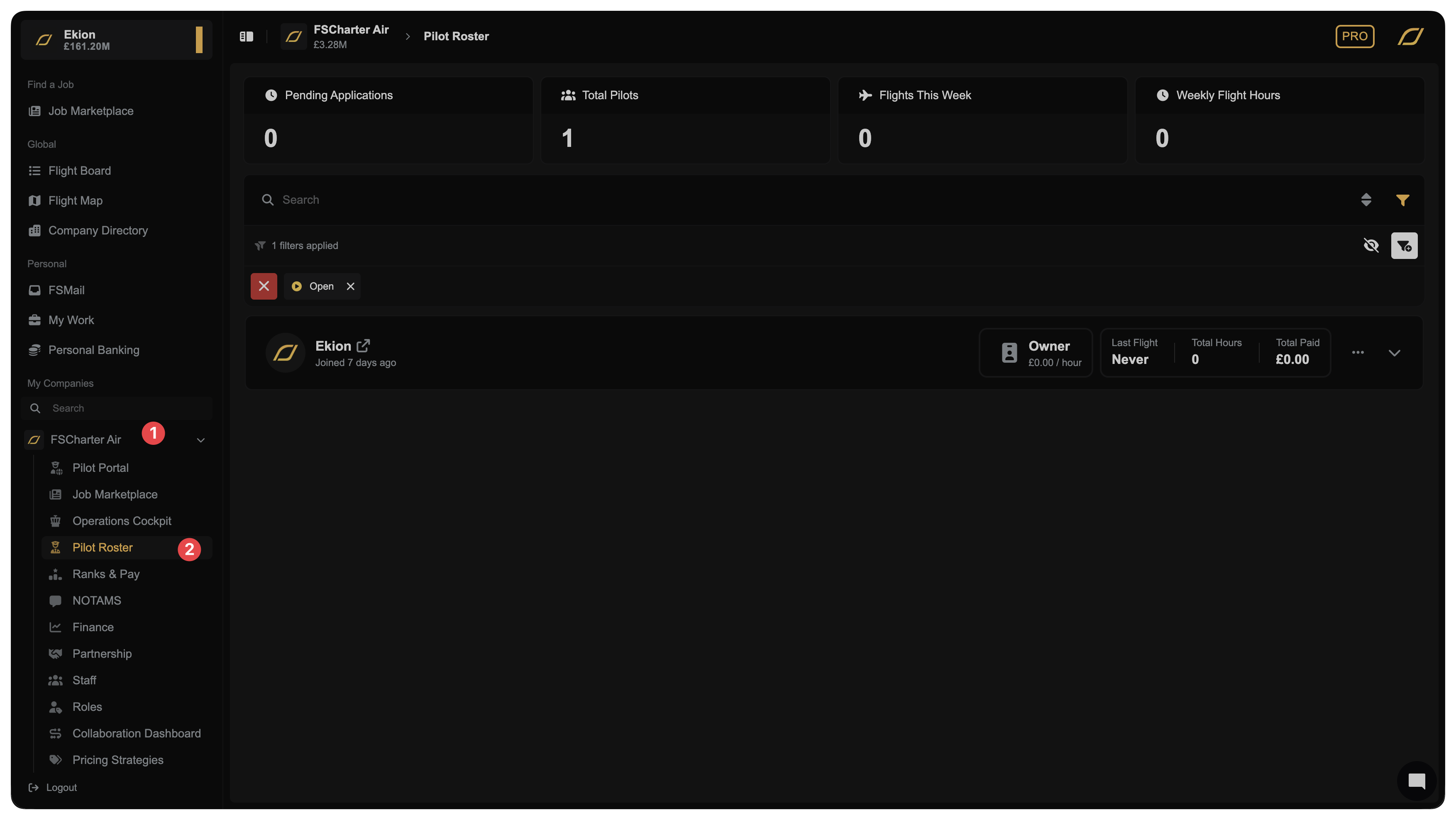
To access the Pilot Roster menu, click on your company in the sidebar 1 and then select Pilot Roster 2. Here, you can see each pilot's rank, hours flown, and status.
Accepting or Rejecting Applications
When pilots apply to join your roster at a specific rank, they appear as Pending Applications. Click Accept to add them to your roster or Reject to decline. You may filter the list of pilots to only show pending applications to make this process easier.
Once you accept a pilot to a rank, the system remembers this approval. If the pilot later switches to a different rank, they can return to any previously-approved rank without needing to apply again. You can revoke these stored approvals from the ... menu on the pilot's roster row if needed.
To reduce manual work, enable Allow Bypassing Application on any rank. Pilots meeting the minimum global rank requirement are then automatically accepted (and their approval is stored for future rank switches).
Removing Pilots
To remove a pilot from your roster, click the ... button on their row and select Remove from Roster. Any unpaid earnings are settled automatically.
When you remove a pilot from the roster, their stored rank approval for their current rank is automatically revoked. If they rejoin your company in the future, they will need to apply and be approved again for the rank.
Managing Rank Approvals
When a pilot joins your roster at a specific rank (either through automatic acceptance or manual approval), the system remembers this approval. This means if the pilot later switches to a different rank, they can switch back to any previously-approved rank without needing to apply again (assuming that they still meet all eligibility criteria).
Why revoke an approval?
You may want to revoke a pilot's approval for a rank if:
The pilot has been demoted and you want to prevent them from switching back to the higher rank without approval
You're restructuring your company and want to limit which ranks pilots can access
To revoke a rank approval:
Navigate to Pilot Roster in your company sidebar
Find the pilot in your roster
Click the ... menu on their row
Select Manage Rank Approvals
You'll see all ranks the pilot has been approved for (through past applications or automatic acceptance)
Click Revoke next to any approval you want to remove
Important notes:
Revoking an approval does not remove the pilot from their current rank
If the pilot is currently on the roster entry for a revoked rank, they will remain on it until you manually remove them
Once revoked, the pilot will need to apply again (and receive approval) to access that rank in the future
You cannot manage approvals for the company owner
If you remove a pilot from the roster entirely, their approval for their currently held rank is automatically revoked. All other approvals remain unless manually removed.